
 About Us


Our first block-based coding program for children as young as five
What is Blocks Jr?
Based on ScratchJr, Blocks Jr is an introductory programming language designed to help young children aged 5 to 7 develop their computational thinking skills through play. Created by Robotical, Blocks Jr uses icons instead of text, making it ideal for pre readers and early learners.
Much like Blocks, (based on Scratch and aimed at children aged 8 and up) Blocks Jr allows learners to create interactive stories and games. The difference is that every feature in Blocks Jr has been carefully designed to support younger children’s cognitive, personal, social and emotional development.
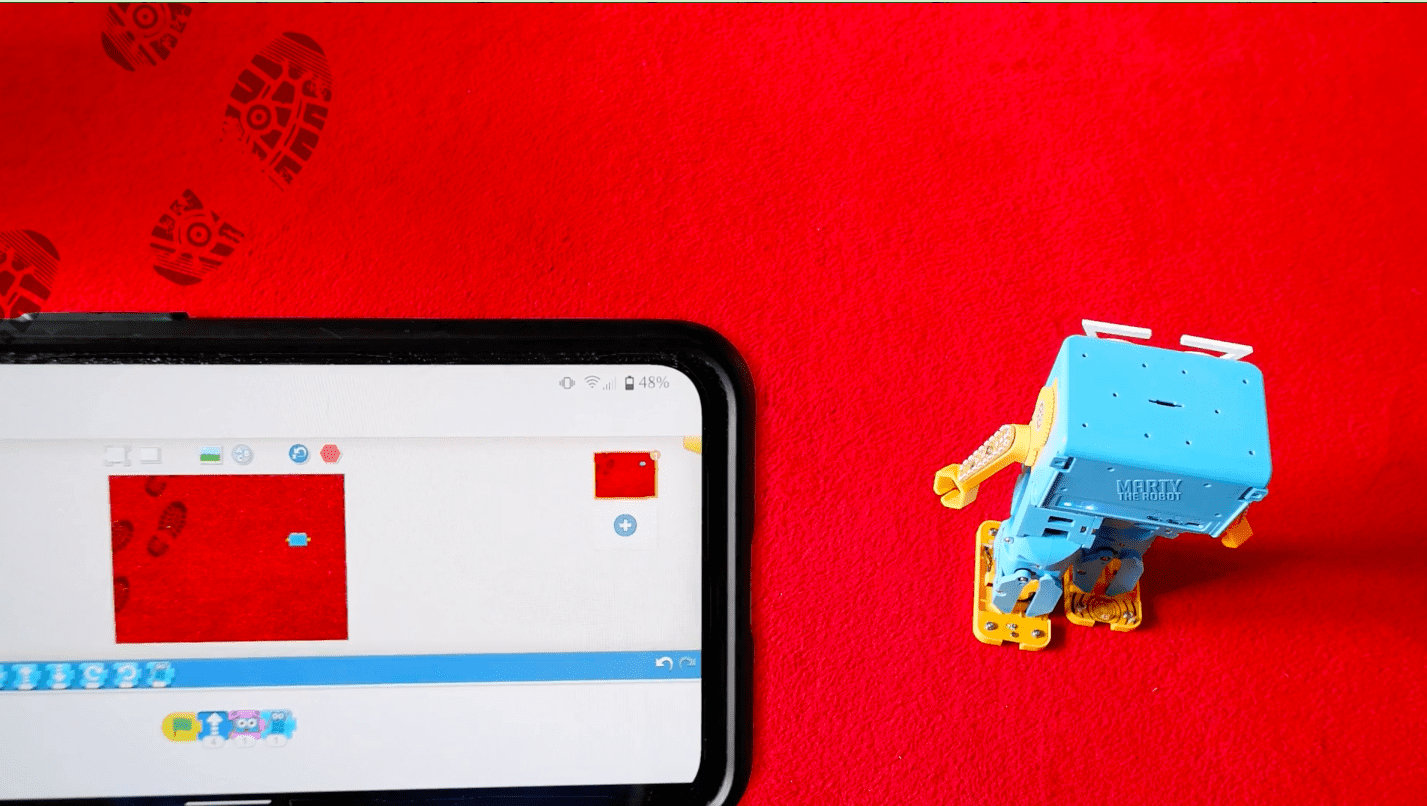
Children can drag and snap together colourful programming blocks to control their Marty sprite, making it move, react and make sounds. When connected to a physical robot, their code comes to life both on screen and in the real world, helping learners clearly link cause and effect.
One feature that makes Blocks Jr unique is its birds eye view of the Marty sprite. Motion blocks closely mimic how the physical robot moves, helping children better understand spatial awareness and real world movement.
What Will Children Learn with Blocks Jr?
Learning to code from an early age helps children build strong foundations for future learning. Blocks Jr gives young learners a way to express creativity while developing key skills through play, using both a device and physical computing.
Coding supports the development of computational thinking, problem solving, early maths skills and communication. By learning through playful, meaningful activities, children stay motivated and engaged.
At Robotical, the goal is to make coding accessible and exciting for everyone. Blocks Jr acts as the first step in a STEM learning ladder, allowing children to begin coding even before they can read.
How Does Blocks Jr Work?
Connect to Marty the Robot:
Learners can use Blocks Jr with or without a physical robot. If you have Marty the Robot, connecting is quick and simple. With just one click, Marty connects to the app and mirrors the on screen actions in the real world.
Children can create fun sequences and instantly see physical Marty perform them alongside the Marty sprite. If you do not yet have a robot, learners can still enjoy programming, storytelling and exploration using the sprite through the Robotical App or web app alone.
Snap Together Colorful Coding Blocks:
Blocks Jr introduces programming through a drag and drop approach. Instead of text, children use icon based blocks, removing reading barriers and allowing younger learners to focus on logic and sequencing.
Blocks are colour coded and easy to recognise:
Blue motion blocks control how Marty moves, from walking and turning to dancing. Children can change the number of steps, supporting early maths and problem solving.

These blocks give children the opportunity to improve their mathematical and problem-solving skills as there is an option to alter the number of steps Marty will take to complete an action!
For example, to make Marty turn in a full circle to the right, you can change the number to 20.

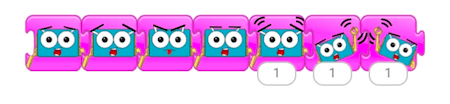
Purple emotion blocks give Marty expression, allowing learners to explore feelings such as excitement, curiosity or amusement.
Green sound blocks let Marty react with sounds like whistles, exclamations and expressions of surprise.

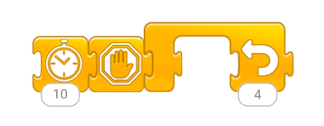
Orange control blocks allow learners to pause, repeat or stop actions, while yellow start and red end blocks define the beginning and end of a sequence.
Get creative with the Paint Editor:
Blocks Jr includes a paint editor that encourages creativity and self expression. Children can personalise their Marty sprite with colours, accessories and even a new name.
The paint editor can also be used to customise backgrounds. Learners can draw trees, houses, robots or imaginary landscapes, turning coding into storytelling and imaginative play.
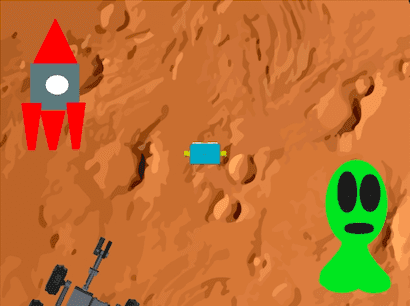
Who knows, maybe on Marty’s next mission to Mars they may encounter a Martian!
Programming Cog with Blocks Jr
In 2025, Blocks Jr expanded beyond Marty the Robot with the launch of Robotical Cog, a physical computing device designed to make coding for young learners hands-on.
Cog can be programmed directly within the Blocks Jr environment, allowing learners to see their code come to life both physically and digitally. As children snap together blocks, Cog responds in real time while an in app sprite mirrors the behaviour on screen.
Cog features a range of engaging inputs including tilt, motion sensors, light sensors and a force sensitive button. These inputs help children explore cause and effect in a tangible way.
Cog’s outputs bring code to life through 13 multicoloured LEDs, a built in speaker for sounds and music, and interactive control of on screen sprites. Learners can even create their own music, personalise sprites and change virtual backgrounds, blending physical computing with creative play.
By using Cog alongside Blocks Jr, complex ideas feel simple, exciting and accessible. Children are not just coding on a screen, they are interacting with the world around them.
Try Blocks Jr Today!
You can find the Robotical App on both iOS and Android App stores, or vie your web browser here.

Other posts you may like
Why is AI Literacy Important?
As we mark AI Literacy Day, it is worth asking a crucial question: why does AI literacy matter so much for today’s students? It's a fundamental part of the digital...
Why Probeware Matters in Science Education
In today’s classrooms, hands-on learning is essential. Students learn best when they can see, measure, test, and experience concepts directly. That’s where probeware comes in. By giving learners the tools...
Raspberry Pi and Marty the Robot
Marty doesn’t require a Raspberry Pi to be programmable in unplugged mode, Blocks Jr, Blocks, or python, but it is super-easy to add a Raspberry Pi computer to Marty the…
TRY MARTY
FOR FREE
Are you looking for new STEM resources for your classroom? Robotical are loaning Marty the Robot to schools for no-obligation, 2 week trials.